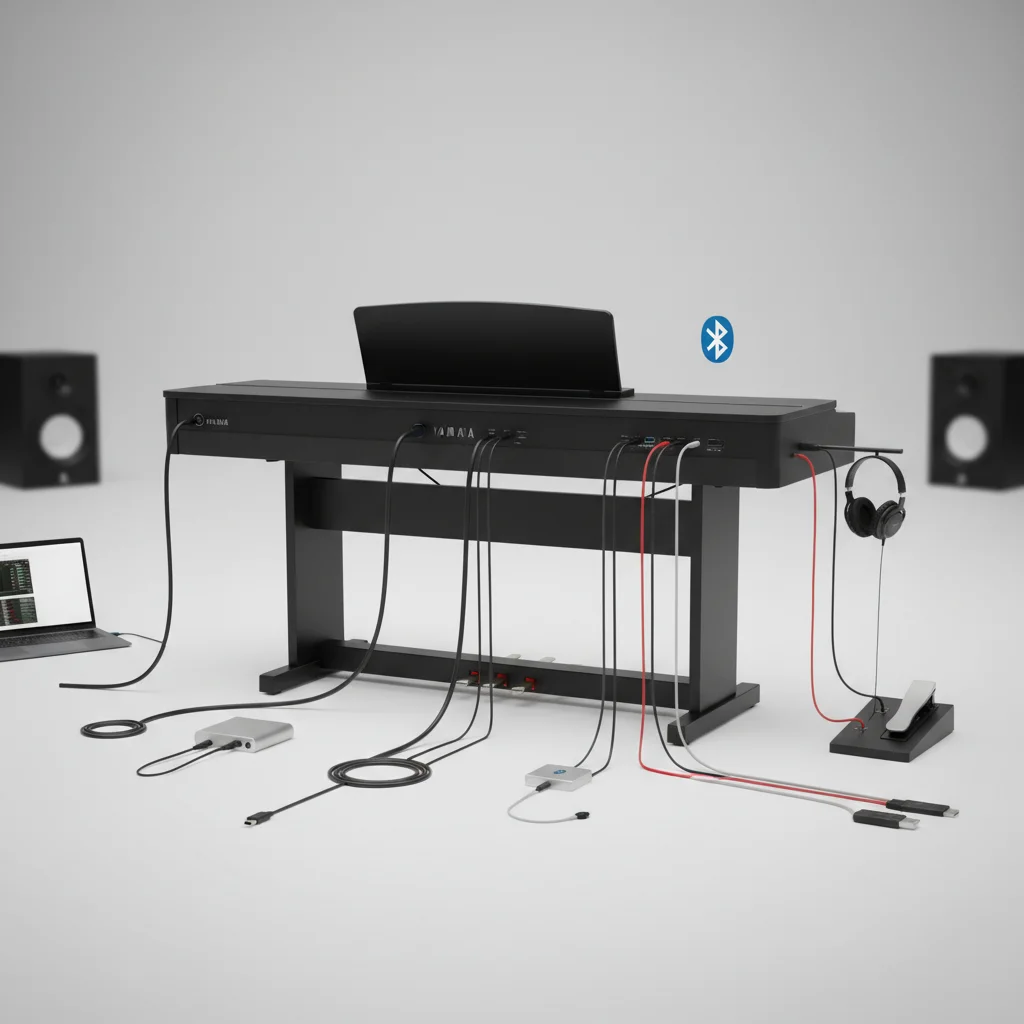
Digital pianos offer a surprising number of ways to connect to other devices, enhancing their versatility for practice, performance, and recording. In fact, there are typically five primary methods for connecting your digital piano, each serving different purposes and opening up new possibilities for musicians of all levels.
USB MIDI: The Digital Hub for Software and Computers
USB MIDI (Musical Instrument Digital Interface) is arguably the most common and versatile connection on modern digital pianos. This port allows you to connect your piano directly to a computer, tablet, or even a smartphone, transforming it into a powerful MIDI controller. With a USB MIDI connection, you can interact with Digital Audio Workstations (DAWs) like GarageBand, Ableton Live, or Logic Pro, enabling you to record your performances, compose music, and utilize a vast library of virtual instruments and effects. It’s also essential for using many piano learning apps that provide real-time feedback and interactive lessons. For complete digital pianos library on this site.
Audio Outputs: Connecting to Amplifiers and Recording Gear
Most digital pianos feature dedicated audio output jacks, typically 1/4-inch (6.35mm) stereo outputs. These outputs are crucial for connecting your piano to external amplification systems, such as keyboard amplifiers, PA systems, or studio monitors, allowing you to project your sound in larger spaces or achieve a more refined listening experience. For recording purposes, these outputs can be connected to audio interfaces, mixers, or directly to recording devices, capturing the high-quality sound of your digital piano for studio-grade tracks or live performance recordings.
Headphone Jacks: Private Practice and Monitoring
|
Our Picks for the Best Digital Piano in 2026
As an Amazon Associate I earn from qualifying purchases.
|
||
| Num | Product | Action |
|---|---|---|
| 1 | Roland FP-10 | Compact 88-Note Digital Piano | SuperNATURAL Piano Tones | Authentic Acoustic Feel Keyboard | Great for Beginners & Experienced Players | Bluetooth & MIDI Connectivity |

|
| 2 | Yamaha 88-Key Weighted Portable Digital Piano Keyboard with Music Rest, Sustain Foot Switch, Built-in Speakers, USB Connectivity, Black (P45B) |
|
| 3 | Alesis Melody 61 MK4 Keyboard Piano for Beginners with 61 Keys, Speakers, Stand, Bench, Headphones, Tablet/Sheet Music Stand, 300 Sounds and Music Lessons |
|
| 4 | Yamaha 88-Key Digital Piano with Weighted Keys, Compact Design, Bluetooth, Keyboard, Music Rest, Sustain Foot Switch, and Built-in Speakers for Home Practice or Travel P145BT |
|
| 5 | Yamaha P225 88-Key Digital Piano with Weighted Keys, Portable Design, Keyboard, Music Rest, Sustain Foot Switch, and Built-In Speakers, Black (P225B) |
|
| 6 | Portable Piano Keyboard, Semi-Weighted Folding Digital Piano 88 Key, Full Size, Wood Grain, Electric Piano Keyboard w/MIDI Bluetooth, Suitable for Adult, Toddler |
|
| 7 | 61 keys keyboard piano, Electronic Digital Piano with Built-In Speaker Microphone, Sheet Stand and Power Supply, Portable piano Keyboard Gift Teaching for Beginners |
|
| 8 | RockJam RJ761 61 Key Keyboard Piano with Keyboard Bench, Digital Piano Stool, Sustain Pedal, Headphones & Lessons |
|
| 9 | Rhymo Folding Piano Keyboard, 61 Keys Sensitive Electric Piano, Weighted Portable Electric Keyboards with Bluetooth MIDI, Digital Foldable Keyboard for Beginner (Black) |
|
| 10 | STRICH 88 Key Digital Piano Foldable Full Size Electric Keyboard with Semi-Weighted Sensitive Keys, Portable Electric Piano Set for Beginner, Bundle with Sustain Pedal, Headphones, Music Rest, SEP-88F |
|
Every digital piano comes equipped with at least one, and often two, headphone jacks (usually 1/4-inch or 1/8-inch stereo). These are indispensable for private practice sessions, allowing you to play without disturbing others and to focus intently on your sound. Having two headphone jacks is particularly useful for duets or for a teacher and student to listen simultaneously. The quality of the headphone output can significantly impact your practice experience, so choosing good headphones is just as important as the connection itself.
- Practice silently without disturbing others.
- Monitor your playing with clarity and detail.
- Facilitate teacher-student lessons or duets.
- Identify subtle nuances in your performance.
- Enjoy immersive sound without external distractions.
Auxiliary Inputs: Play Along with Your Favorite Tracks
Many digital pianos include an auxiliary input (Aux In) jack, often a 1/8-inch (3.5mm) stereo input. This feature allows you to connect external audio sources, such as an MP3 player, smartphone, or tablet, and play their audio through your digital piano’s speakers or headphones. This is incredibly useful for practicing along with backing tracks, learning new songs by ear, or simply using your piano as a high-quality speaker system for your music. It integrates seamlessly into your practice routine, making learning more engaging and enjoyable.
Pedal Inputs: Expanding Expressive Control
Digital pianos typically have one or more pedal inputs, most commonly for a sustain pedal. More advanced models may include inputs for a soft pedal and a sostenuto pedal, mimicking the full three-pedal setup of an acoustic grand piano. These connections are vital for adding expressive dynamics and realism to your playing. The sustain pedal, in particular, is fundamental for almost all piano repertoire, allowing notes to ring out after the keys are released, creating a richer and more connected sound. Ensuring your pedals are properly connected and functioning is key to a complete playing experience.
Understanding the various connectivity options available on your digital piano can significantly enhance your musical journey. From recording and composing with USB MIDI to private practice with headphones and playing along with auxiliary inputs, these connections unlock the full potential of your instrument, making it a versatile tool for learning, performance, and creative expression.
Get our weekly buyer guide
Practical specs, not advice. Unsubscribe anytime.
