Digital pianos require consistent care to ensure longevity, maintain optimal performance, and preserve aesthetic appeal, even though they don’t need tuning or protection from extreme humidity like acoustic instruments. Neglecting basic maintenance can lead to issues such as sticky keys or electronic malfunctions, impacting your playing experience and shortening the instrument’s life. This guide covers essential practices from daily cleaning and environmental considerations to proper power management and long-term storage, helping your digital piano remain a reliable source of musical joy for years.
Understanding Digital Piano Maintenance
Digital pianos are modern marvels, combining traditional piano feel with advanced digital capabilities. Unlike acoustic pianos, which are sensitive to environmental changes and require regular tuning, digital pianos use electronic components and advanced sampling technologies. This means they don’t need tuning and are more resilient to temperature and humidity fluctuations. However, their electronic nature makes them susceptible to dust, moisture, and electrical issues. Understanding these distinctions is crucial for proper care, preserving intricate internal mechanisms, ensuring consistent sound quality, and protecting your investment.
Maintaining Your Digital Piano’s Appearance and Functionality
Keeping your digital piano in pristine condition involves regular cleaning, mindful environmental control, and careful handling. These practices are crucial for both its aesthetic appeal and its reliable performance.
Keeping Your Digital Piano Clean
Dust is a significant threat to any electronic instrument, accumulating on and between keys, within control panels, and potentially infiltrating internal components, leading to operational issues. Regular cleaning is therefore paramount.
- General Dusting: Lightly dust your entire digital piano after each use. A soft, dry microfiber cloth is ideal for trapping dust particles without scratching the finish. For larger dust bits or hard-to-reach areas, use a feather duster or a soft artist brush before wiping with a cloth.
- Cleaning the Keys: Keys are frequently touched, accumulating skin oils, dirt, and residue.
- Initial Dust Removal: Gently dust the keys, working from the back towards the front (towards you) to prevent dust from lodging deeper into the key mechanisms.
- Gentle Wipe: For a thorough clean, lightly dampen a separate microfiber cloth with lukewarm water. For stubborn marks, use a tiny drop of mild dish soap mixed with distilled water. Wring the cloth thoroughly so it is barely damp, as excess moisture is harmful.
- Wiping Technique: Wipe each key gently from the back (farthest from you) towards the front (closest to you). This prevents moisture from seeping into key hinges and internal sensors.
- Immediate Drying: Immediately follow with a clean, dry microfiber cloth to ensure no moisture is left behind.
- Sticky Keys: If keys are sticky due to residue, use a cotton swab lightly dampened with 70% isopropyl alcohol (diluted if necessary) on affected keys, followed by an immediate dry wipe. Avoid alcohol on older ivory keys, as it can cause discoloration.
- What to Avoid: Never use harsh chemicals, abrasive materials, or cleaning agents containing bleach, ammonia, acetone, or heavy fragrances, as these can damage the finish or internal electronics. Avoid spraying any liquid directly onto the piano.
- Cleaning the Finish: For exterior surfaces, use a soft microfiber cloth, slightly dampened with water or a mild soap solution, to wipe away fingerprints and smudges. Always dry immediately with a separate clean, dry cloth.
- Control Panel and Screens: Clean these delicate areas only with a soft, dry, lint-free cloth. For display screens, a small lens cloth can be used.
 A person gently wiping the keys of a digital piano with a microfiber cloth, highlighting careful maintenance
Protecting from Environmental Factors
|
Our Picks for the Best Digital Piano in 2026
As an Amazon Associate I earn from qualifying purchases.
|
||
| Num | Product | Action |
|---|---|---|
| 1 | Rhymo Folding Piano Keyboard, 61 Keys Sensitive Electric Piano, Weighted Portable Electric Keyboards with Bluetooth MIDI, Digital Foldable Keyboard for Beginner (Black) |

|
| 2 | Portable Piano Keyboard, Semi-Weighted Folding Digital Piano 88 Key, Full Size, Wood Grain, Electric Piano Keyboard w/MIDI Bluetooth, Suitable for Adult, Toddler |
|
| 3 | Yamaha 88-Key Digital Piano with Weighted Keys, Compact Design, Bluetooth, Keyboard, Music Rest, Sustain Foot Switch, and Built-in Speakers for Home Practice or Travel P145BT |
|
| 4 | STRICH 88 Key Digital Piano Foldable Full Size Electric Keyboard with Semi-Weighted Sensitive Keys, Portable Electric Piano Set for Beginner, Bundle with Sustain Pedal, Headphones, Music Rest, SEP-88F |
|
| 5 | Roland FP-10 | Compact 88-Note Digital Piano | SuperNATURAL Piano Tones | Authentic Acoustic Feel Keyboard | Great for Beginners & Experienced Players | Bluetooth & MIDI Connectivity |
|
| 6 | 61 keys keyboard piano, Electronic Digital Piano with Built-In Speaker Microphone, Sheet Stand and Power Supply, Portable piano Keyboard Gift Teaching for Beginners |
|
| 7 | RockJam RJ761 61 Key Keyboard Piano with Keyboard Bench, Digital Piano Stool, Sustain Pedal, Headphones & Lessons |
|
| 8 | Alesis Melody 61 MK4 Keyboard Piano for Beginners with 61 Keys, Speakers, Stand, Bench, Headphones, Tablet/Sheet Music Stand, 300 Sounds and Music Lessons |
|
| 9 | Yamaha P225 88-Key Digital Piano with Weighted Keys, Portable Design, Keyboard, Music Rest, Sustain Foot Switch, and Built-In Speakers, Black (P225B) |
|
| 10 | Yamaha 88-Key Weighted Portable Digital Piano Keyboard with Music Rest, Sustain Foot Switch, Built-in Speakers, USB Connectivity, Black (P45B) |
|
While digital pianos are more forgiving than acoustic ones, a stable environment is vital for optimal performance and longevity.
- Temperature and Humidity: Digital pianos tolerate a broader range of temperature and humidity. However, avoid extreme fluctuations. Ideal room conditions are 68-72°F (20-22°C) with 40-50% relative humidity. Excessive heat damages electronic components and plastic casings, while high humidity can cause moisture damage or mold growth.
- Direct Sunlight and Heat Sources: Position your digital piano away from direct sunlight, which can fade its finish and cause temperature swings. Keep it clear of heat sources like radiators, heaters, or vents, as prolonged exposure can warp the casing or affect internal parts.
- Liquids and Spills: Keep liquids away from any electronic device. Even a small spill can cause severe circuit damage or a fire risk. Avoid eating or drinking near your digital piano to prevent grease and spills from damaging sensors.
- Dust and Debris: Dust is a constant threat. Use a dedicated dust cover when the piano is not in use to protect it from dust, pet hair, and accidental spills. Breathable materials like cotton or polyester are preferable to plastic covers, which can trap moisture. Keep pets away from the piano to prevent fur and hair from entering internal components.
- Placement: Ensure your digital piano is on a flat, stable surface to prevent wobbling or mechanical strain. Avoid high-traffic areas where it might be bumped or where people might lean or sit on it, which can cause structural damage. An interior wall provides more stable environmental conditions than an exterior wall.
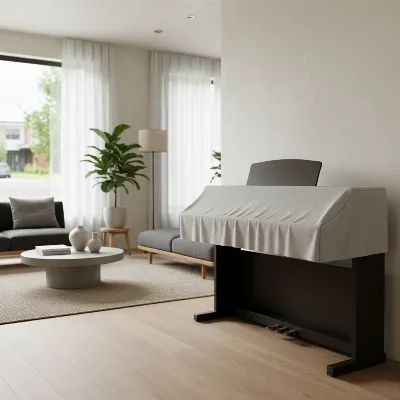 A modern digital piano covered with a breathable dust cover, positioned away from a window for environmental protection
Power Management and Electrical Care
Proper electrical care is crucial for safe and reliable operation.
- Proper Power Supply: Always use the manufacturer-specified power adapter. Incompatible adapters can damage internal components.
- Safe Plugging and Unplugging: Turn off and unplug your digital piano before connecting or disconnecting any cables to prevent electrical damage or power surges. Be gentle to avoid straining connections. Avoid overloading electrical outlets.
- Cable Management: Keep power cords and cables neatly organized to prevent tripping hazards, accidental disconnections, or damage. Cable ties or sleeves are helpful.
- Turning Off Properly: Always power down your digital piano using the designated power button before unplugging it from the wall. Directly pulling the plug while the piano is on can cause electrical issues.
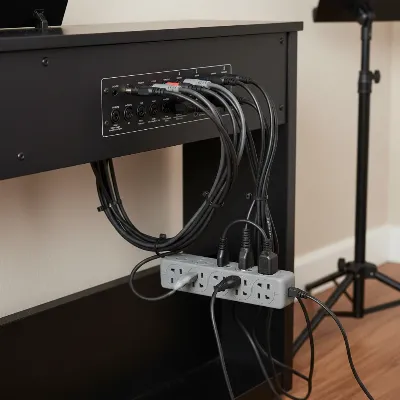 Close-up of neatly organized power cords and cables behind a digital piano for safety
Long-Term Care and Storage
If storing your digital piano for an extended period, proper precautions protect it from damage and ensure it’s ready to play when you return.
Preparing for Storage
- Thorough Cleaning: Before storage, thoroughly clean all surfaces, keys, and control panels to remove dust and grime.
- Unplug and Disconnect: Ensure the digital piano is completely powered down and unplugged. Disconnect all cables, including the power cord, pedal unit, and any external devices. If your piano uses batteries, remove them to prevent corrosion. Store accessories separately.
- Covering: Cover your digital piano with a breathable dust cover made of cotton or polyester. Avoid plastic sheeting, which can trap moisture and promote condensation.
- Original Packaging: Original boxes and packing materials offer the best protection for transport and long-term storage. If unavailable, invest in a padded gig bag or case.
Choosing a Storage Location
The storage environment is critical.
- Climate Control: Aim for a storage area with consistent temperature and humidity, ideally 65-75°F and 40-50% humidity. Avoid basements, attics, or garages where conditions fluctuate wildly.
- Protection from Elements: The storage spot should be free from direct sunlight, heating or cooling vents, and sources of excessive moisture or dryness.
- Avoid Stacking: Never stack heavy items on your digital piano, even in its case, as weight can damage internal components or the casing.
- Vertical Storage: Some digital pianos can be stored vertically if properly supported and secured. Consult your owner’s manual for recommendations and use sturdy padding and a stable stand. Horizontal storage is generally safest.
- Air Circulation: Ensure adequate air circulation around the piano, especially if placed against a wall or other items.
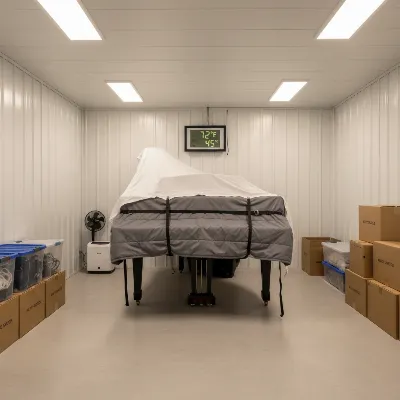 A digital piano safely stored in a climate-controlled unit, with protective padding and breathable cover
Troubleshooting and Professional Help
While regular maintenance prevents many issues, consult your owner’s manual for malfunctions, unusual sounds, or persistent problems. If the problem persists, contact the manufacturer’s authorized service center or a qualified technician. Attempting self-repair can void warranties and cause further damage. Early detection and professional intervention can prevent costly repairs.
Conclusion
Your new digital piano is a valuable possession and a gateway to musical expression. Proactive maintenance preserves its pristine condition and ensures a consistent, enjoyable playing experience for many years. Regular cleaning keeps dust and grime at bay, proper environmental control protects sensitive electronics, and careful power management safeguards operational integrity. Each maintenance step, from a quick wipe-down to preparing for long-term storage, contributes significantly to its longevity and performance. A well-cared-for digital piano will always be ready to sing its beautiful melodies, inspiring you every time you sit down to play.
Frequently Asked Questions
How often should I clean my digital piano keys?
It’s recommended to lightly wipe your digital piano keys with a dry microfiber cloth after each playing session to remove oils and dust. For a deeper clean using a slightly damp cloth with mild soap, aim for once a week or as needed to address visible smudges or residue.
Can I use furniture polish on my digital piano?
No, generally you should avoid using standard furniture polish on your digital piano. Many polishes contain chemicals, waxes, or silicones that can damage the finish, leave residue, or react negatively with the plastic or composite materials of the piano casing and keys. Stick to a soft, slightly damp microfiber cloth for cleaning the finish.
Is humidity control really necessary for a digital piano?
While digital pianos are far less sensitive to humidity than acoustic pianos, extreme humidity fluctuations can still affect their electronic components over a long period. Maintaining a stable room environment (around 40-50% relative humidity and stable temperature) is beneficial, especially for preserving plastic parts and overall electronic integrity.
What should I do if a key gets sticky?
For sticky keys, first, power off and unplug your piano. Gently wipe the key with a cotton swab lightly dampened with 70% isopropyl alcohol, ensuring no excess moisture drips into the keyboard. Immediately dry the key thoroughly with a clean, dry cloth. If the problem persists, consult your owner’s manual or a professional technician.
Can I move my digital piano myself?
For portable digital pianos, moving them yourself is generally safe, especially if using their original case or a padded gig bag. For console-style digital pianos, it’s advisable to disassemble them according to the manual’s instructions and have at least two people move the heavier components to prevent damage to the instrument or injury to yourself.
Frequently Asked Questions
How often should I clean my digital piano keys?
It is recommended to lightly wipe your digital piano keys with a dry microfiber cloth after each playing session to remove oils and dust. For a deeper clean using a slightly damp cloth with mild soap, aim for once a week or as needed to address visible smudges or residue.
Can I use furniture polish on my digital piano?
No, you should generally avoid using standard furniture polish on your digital piano. Many polishes contain chemicals, waxes, or silicones that can damage the finish, leave residue, or react negatively with the plastic or composite materials of the piano casing and keys. Stick to a soft, slightly damp microfiber cloth for cleaning the finish.
Is humidity control really necessary for a digital piano?
While digital pianos are far less sensitive to humidity than acoustic pianos, extreme humidity fluctuations can still affect their electronic components over a long period. Maintaining a stable room environment, ideally around 40-50% relative humidity and stable temperature, is beneficial for preserving plastic parts and overall electronic integrity.
What should I do if a key gets sticky on my digital piano?
For sticky keys, first, power off and unplug your piano. Gently wipe the key with a cotton swab lightly dampened with 70% isopropyl alcohol, ensuring no excess moisture drips into the keyboard. Immediately dry the key thoroughly with a clean, dry cloth. If the problem persists, consult your owner's manual or a professional technician.
Can I move my console-style digital piano by myself?
For console-style digital pianos, it is advisable to disassemble them according to the manual's instructions and have at least two people move the heavier components. This prevents damage to the instrument and potential injury to yourself. Portable digital pianos are generally safe to move alone, especially with a padded gig bag.
Maintain Your Digital Piano
Follow these steps to keep your digital piano in optimal condition, ensuring its longevity and performance.
Lightly dust your entire digital piano after each use with a soft, dry microfiber cloth. This prevents dust accumulation on keys and within control panels, which can lead to operational issues over time.
Dust keys from back to front, then wipe with a barely damp microfiber cloth (with mild soap if needed). Immediately dry each key with a separate clean, dry cloth to prevent moisture from seeping into key mechanisms.
Position your piano away from direct sunlight and heat sources, maintaining a stable room temperature of 68-72u00b0F (20-22u00b0C) and 40-50% relative humidity. Use a breathable dust cover when not in use to protect against dust and spills.
Always use the manufacturer-specified power adapter and turn off the piano before plugging or unplugging cables. Organize cords neatly to prevent hazards and always power down correctly using the designated button.
For long-term storage, thoroughly clean the piano, disconnect all cables, remove batteries, and cover it with a breathable dust cover. Store it in a climate-controlled area, ideally 65-75u00b0F and 40-50% humidity, avoiding stacking items on top.
Get our weekly buyer guide
Practical specs, not advice. Unsubscribe anytime.

The tips on daily cleaning were super helpful. I always wiped down my keys, but I didn’t realize how important it was to use a microfiber cloth and avoid harsh chemicals. My keys feel much better now, and I’m less worried about damaging the finish. Good advice for keeping it looking new.
I’ve had my digital piano for years and honestly, I never really thought about proper power management until reading this. I used to just unplug it whenever, but now I’m making sure to always power it down correctly. It’s a small change but makes sense for keeping the electronics healthy. Thanks for the reminder!
I appreciate the advice on environmental considerations, especially about avoiding direct sunlight. My piano is near a window, and I hadn’t considered the long-term effects. The only thing is, I wish there were more specific recommendations for covers or ways to protect it without moving it entirely. Still, good to know.
This guide really clarified the differences in maintenance between acoustic and digital pianos. I used to worry about humidity, but it’s great to know my digital piano isn’t as sensitive. The section on long-term storage was also very useful for when I travel. My instrument feels much more cared for now.